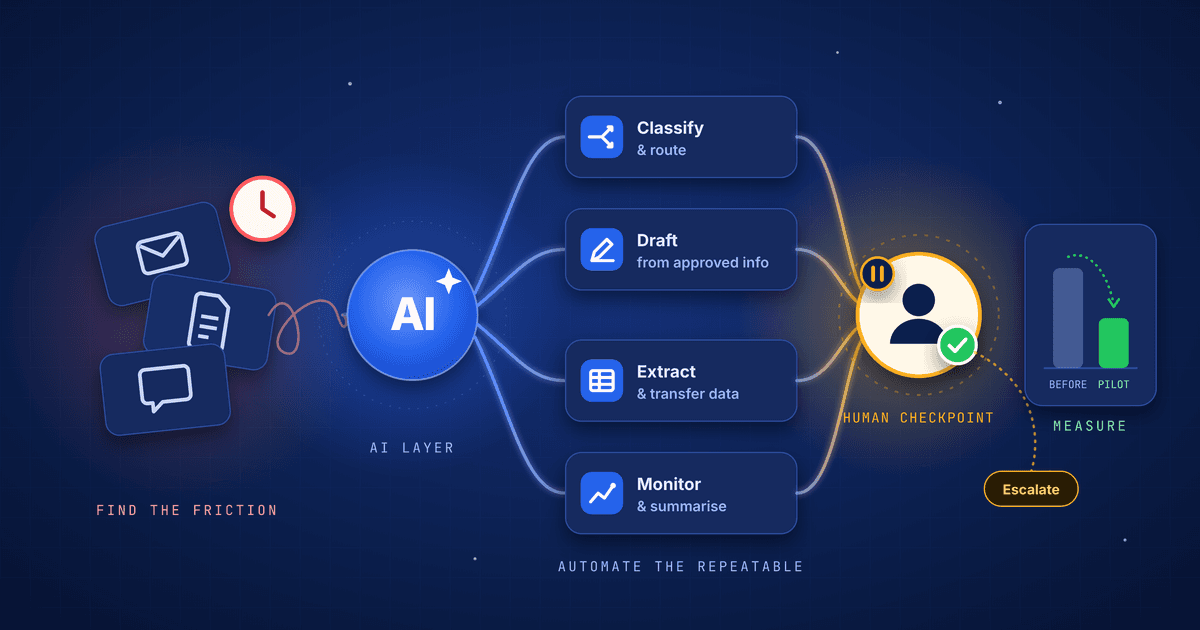
AI automation works best when it removes repetitive friction without removing accountability. This practical guide explains how to choose the right first workflow, design human oversight and measure whether the system is genuinely improving the business.
AI automation is often introduced as a technology decision: choose a model, connect a few tools and wait for productivity to improve. In practice, successful automation begins somewhere less glamorous—with a close look at how work actually moves through the business.
The best first question is not, “Where can we use AI?” It is, “Where does useful work repeatedly slow down?”
That change in perspective matters. It keeps the project focused on a real operational outcome rather than a demonstration. It also makes it easier to decide which parts of a workflow should be automated and which decisions should remain with people.
Start with the workflow, not the tool
Every business contains processes that consume attention without creating much distinction: sorting enquiries, copying information between systems, preparing routine summaries, checking documents for missing fields or routing requests to the right person.
These are often better starting points than highly visible, high-stakes decisions. A useful first automation project has several characteristics:
the work happens frequently;
the input and desired output are reasonably clear;
the current process has an identifiable cost in time, delay or errors;
a person can review exceptions without becoming a new bottleneck;
success can be measured against the existing process.
The task should also be narrow enough to describe in plain language. “Improve customer service with AI” is too broad. “Classify incoming support requests, draft a suggested response and route urgent cases to a human” is specific enough to design and test.
NIST’s AI Risk Management Framework uses four connected functions—Govern, Map, Measure and Manage. For a small business pilot, these ideas translate into practical questions: Who owns the automation? What is it intended to do? How will performance and risk be measured? What happens when it fails?
What businesses should automate first
The strongest early candidates tend to fall into four groups.
1. Classification and routing
AI can help read incoming information, identify its purpose and send it to the correct workflow. Examples include categorising enquiries, routing leads, tagging documents or prioritising support requests.
This is valuable because the system is organising work rather than making the final decision. A person can still review uncertain or sensitive cases.
2. Drafting from approved information
Many teams repeatedly turn structured information into a first draft: meeting notes into action items, product data into descriptions, a customer history into a response or a set of results into a report summary.
The important design choice is grounding. The automation should work from approved business information and clearly distinguish source material from generated language. The output should be a draft when accuracy, tone or customer impact matters.
3. Data extraction and transfer
Businesses still spend substantial time moving information from emails, forms and documents into internal systems. AI can help identify fields, normalise formats and prepare records for review.
This type of automation becomes much safer when validation rules sit around the model. An invoice total can be checked mathematically. A required identifier can be matched against a known format. Low-confidence results can be held for manual review.
4. Monitoring and summarisation
AI can watch a stream of operational information and surface what deserves attention: overdue work, unusual changes, repeated customer issues or activity that does not match an expected pattern.
The goal is not to hide the underlying information. It is to help people find the signal faster and then inspect the evidence behind it.
What should remain human
Automation should not be measured by how completely it removes people. It should be measured by whether it improves the quality and speed of the whole system.
Some responsibilities need clear human ownership:
decisions with legal, financial, employment or safety consequences;
commitments made to customers, employees or partners;
sensitive judgement involving context the system may not possess;
final approval of high-impact or irreversible actions;
exception handling when the workflow encounters something unfamiliar.
The International Labour Organization’s 2025 research on generative AI and jobs found that exposure to AI does not automatically mean replacement. Because many occupations still require human input across varied tasks, transformation is more likely than complete redundancy for much of the workforce.
This is a useful principle for automation design. Break a role into tasks. Automate the repetitive parts where performance can be checked. Preserve human judgement where context, responsibility and trust are essential.
Good automation does not remove accountability. It makes accountability easier to see.
Design the human checkpoint before the automation
A common mistake is to build the automated path first and add human review at the end. The better approach is to decide the checkpoint before implementation.
For each workflow, define:
What can proceed automatically? These should be low-risk actions with clear validation.
What always requires approval? These are high-impact decisions or external commitments.
What should be escalated? Set rules for uncertainty, missing information and unusual cases.
What evidence must the reviewer see? A decision is difficult to verify if the supporting source is hidden.
How can the automation be stopped? Owners need a simple way to pause, override or roll back the system.
The OECD AI Principles similarly emphasise human agency and oversight appropriate to the context. Oversight should not be ceremonial. The reviewer needs enough time, information and authority to change the outcome.
Run a pilot that can produce a clear answer
A pilot is not successful merely because the automation runs. It should answer whether the new process is better than the old one.
Begin by recording a baseline. Depending on the workflow, useful measures might include:
average processing time;
time waiting between steps;
correction or rework rate;
percentage of cases requiring escalation;
customer response time;
employee time spent on repetitive administration;
quality ratings from the people who use or review the output.
Then run the pilot on a controlled portion of real work. Keep a comparison group or historical benchmark where possible. Review failures as carefully as successful outputs, because failures often reveal unclear instructions, weak source data or a workflow that was not as consistent as expected.
NIST recommends testing AI systems before deployment and monitoring them while they are in operation. That matters because workflows, data and model behaviour can all change. Launch is the start of management, not the end of the project.
A practical 30-day starting plan
Week 1: Find the friction
Interview the people doing the work. Map one repetitive workflow from trigger to completion. Record the systems, handoffs, delays and exceptions involved. Choose one measurable problem.
Week 2: Design the smallest useful automation
Define the input, output and human checkpoint. Decide which information the system may use and what it must never receive. Write acceptance tests using realistic examples, including difficult cases.
Week 3: Build and test with supervision
Connect only the systems needed for the pilot. Start with read-only or draft-producing behaviour where possible. Test accuracy, failure handling and permission boundaries before allowing automated actions.
Week 4: Measure and decide
Compare the pilot with the baseline. Ask users where the automation saved time and where it created new work. Decide whether to improve, expand, redesign or stop it. A stopped pilot can still be successful if it prevents a weak system from reaching customers or employees.
The real advantage is a better operating system
AI automation is not a shortcut around understanding the business. It rewards that understanding.
When a team maps its work, defines ownership, improves source information and creates clear checkpoints, it often strengthens the process even before AI is introduced. The technology then becomes one component of a better operating system—one that handles routine work consistently and gives people more time for judgement, relationships and improvement.
The right place to start is rarely the most impressive demonstration. It is the smallest workflow where a useful result can be measured, a failure can be contained and a person remains clearly responsible for the outcome.
Sources & further reading

About WeTakeFwd Editorial Team
The WeTakeFwd Editorial Team explores practical ways businesses can use AI, automation and digital technology to work smarter and grow.
More from this author →