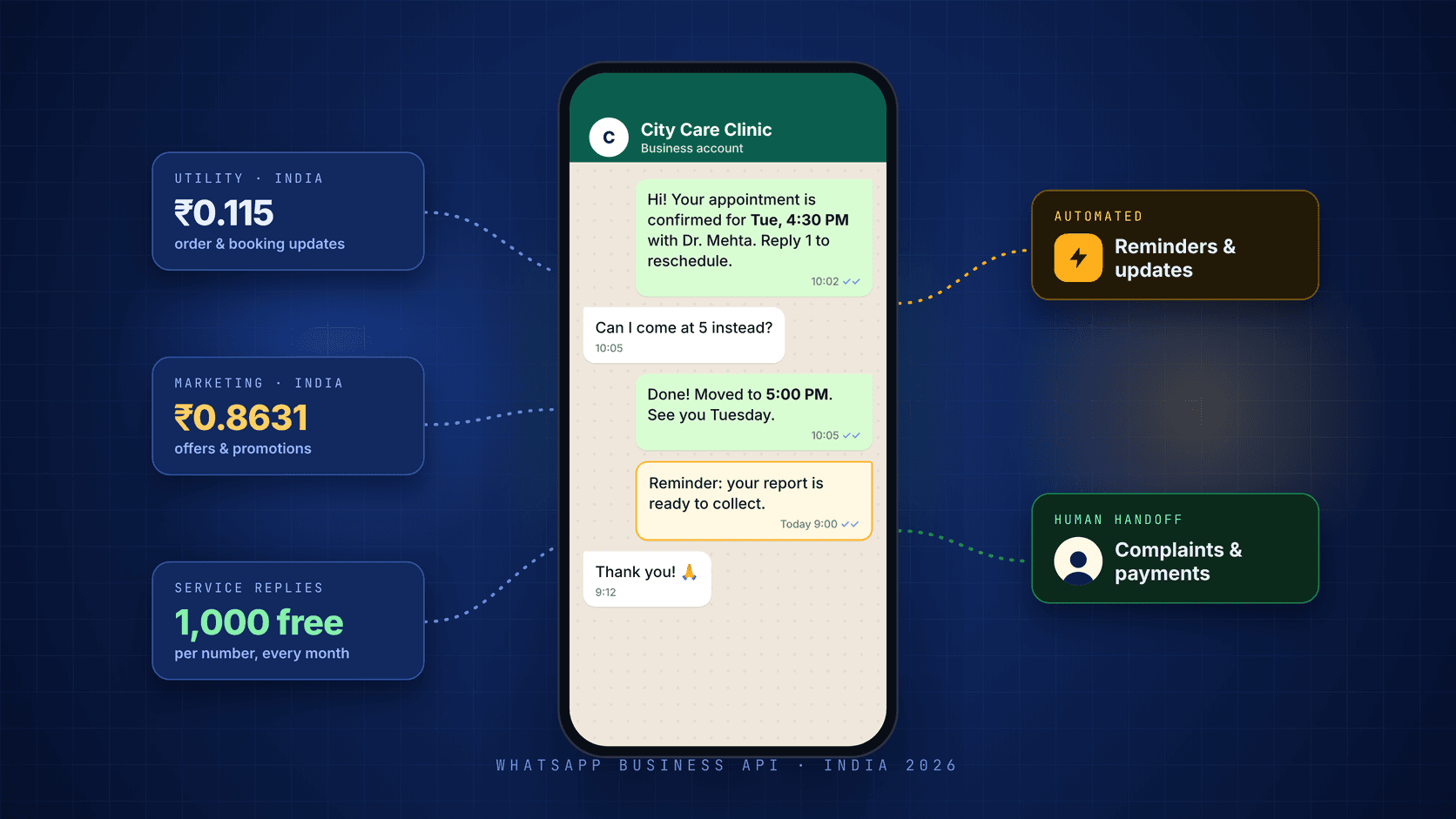
Meta’s India pricing is lower than many businesses expect. The real work is choosing the right message category, protecting customer trust and designing a clear human handoff.
For many Indian businesses, the WhatsApp Business Platform becomes useful once the free Business app’s broadcast and team-working limits start slowing customer communication. At Meta’s India list rate effective 1 October 2026, a utility message such as an order or appointment update costs ₹0.115 before tax and provider fees.
The harder part is rarely the list price. It is choosing what to automate, getting templates approved and making sure customers do not feel spammed.
WhatsApp Business app vs WhatsApp Business Platform
The free app is designed mainly for manual conversations. The Business Platform—often still called the WhatsApp Business API—is designed for teams, software integrations and automated messaging.
Cost: the app is free; the platform uses Meta’s per-message pricing and may also include a provider subscription or markup.
Broadcasting: the app’s broadcast lists are limited and normally reach only people who have saved the number; the platform can message opted-in customers within the account’s messaging limits.
Team access: the app supports a limited set of linked devices; the platform can support many agents through a shared inbox.
Automation: the app offers greetings, away messages and quick replies; the platform supports triggered flows, chatbots and AI-assisted agents.
Integrations: the platform can connect with a CRM, website, ERP, booking system or payment workflow.
A practical rule is to consider the platform when several people need to answer customers, when broadcasts exceed the app’s limits, or when messages must be triggered by another system. Meta now also supports API solutions that allow eligible businesses to use the Business app and API with the same phone number, so check whether your onboarding route supports coexistence before deleting an existing account.
How WhatsApp pricing works in India in 2026
Meta charges for delivered messages and the rate depends on the message category. Messages sent by customers to a business are not charged.
Marketing — offers, promotions, new arrivals and event invitations: ₹0.8631 per delivered message.
Utility — order, booking, payment and delivery updates: ₹0.115 per delivered message.
Authentication — one-time passwords and verification: ₹0.115 per delivered message.
Service — non-template replies inside the 24-hour customer service window: the first 1,000 each month per business phone number are free, then ₹0.115 per delivered message.
These are Meta’s India list rates effective 1 October 2026. Taxes, provider subscriptions and provider markups can increase the final bill, and rates can change. Check Meta’s current rate card or your provider before budgeting.
Three rules that decide most of the bill
The 24-hour window: when a customer messages the business, a customer service window opens. Non-template replies can be sent during that period.
The October 2026 change: service messages beyond the 1,000-message monthly free tier are chargeable, and utility templates sent inside an open service window are also charged.
Free entry points: conversations that begin through eligible Click-to-WhatsApp ads or Facebook Page call-to-action buttons can qualify for a free entry-point window under Meta’s rules.
A worked monthly example
Consider a clinic that sends 3,000 appointment reminders, 1,000 festive offers and 2,500 service replies in one month.
Utility: 3,000 × ₹0.115 = ₹345.00.
Marketing: 1,000 × ₹0.8631 = ₹863.10.
Service: 1,500 charged replies × ₹0.115 = ₹172.50 after the first 1,000 free messages.
Total before tax and provider fees: ₹1,380.60. At 18% GST, that would be approximately ₹1,629.11 if GST applies to the full amount on the invoice.
The offers cost more than everything else combined. That is why template category and message design often matter more than total volume.
How to get WhatsApp Business Platform access
Before starting, prepare a Meta business portfolio, a phone number the business controls and a display name that matches the real business.
Choose the route. Use Meta’s Cloud API directly or a Business Solution Provider. Direct access has no separate Meta access fee, but you must build or obtain the inbox and automation layer. A provider bundles those tools and charges for them.
Connect the Meta business portfolio. Create one in Meta Business Suite if the company does not already have it.
Register the phone number. Verify ownership by SMS or voice call, and confirm whether the onboarding route supports coexistence with the Business app.
Set the display name. Use the same business name that appears on the company website and official records.
Create message templates. Business-initiated messages outside the customer service window require approved templates. Review time varies, even though many templates are reviewed quickly.
Complete business verification when required. Accurate company documents and matching public information help prevent delays and support higher messaging limits.
Messaging limits apply to unique customers contacted outside the customer service window. Meta exposes tiers including 250, 2,000, 10,000, 100,000 and unlimited; the applicable limit depends on the account’s status, verification, message quality and usage. Check the current limit inside WhatsApp Manager rather than assuming a tier.
What to automate first
Start with one message the team already sends repeatedly, where the content is predictable and an error is easy to correct. For most businesses, that is a utility update rather than an offer.
Clinic or hospital: appointment confirmations, reminders and report-ready alerts. Keep medical questions, complaints and sensitive rescheduling with a person.
School or coaching institute: absence alerts, fee reminders and exam schedules. Keep fee waivers, complaints and student issues with staff.
Restaurant: order confirmation, delivery updates and table bookings. Escalate refunds and food complaints.
Online store: order, payment, shipping and delivery updates. Keep damaged-goods and judgement-heavy returns with a person.
Real estate: acknowledge new enquiries and remind people about site visits. Keep negotiation and documentation with an adviser.
Any service business: answer predictable questions about timings, location and published prices, with an obvious route to a person when the menu does not help.
Once the first flow has run reliably for a few weeks, add carefully targeted marketing messages only for customers who agreed to receive them. Measure replies, conversions, blocks and opt-outs—not delivery alone.
Five mistakes that cost Indian businesses money
Messaging people who never opted in. Blocks and reports damage message quality and can restrict the account.
Writing an update like an advertisement. Adding an offer or promotional call to action can move a template into the more expensive marketing category.
Using a display name that does not match the real business. Inconsistency across the website, documents and Meta account can slow approval.
Automating replies that require judgement. Refunds, complaints and money-related exceptions should reach a person quickly with the conversation history attached.
Ignoring the monthly service-message free tier. A busy support number can pass 1,000 free service messages, so track usage rather than assuming every reply remains free.
Frequently asked questions
Is the WhatsApp Business Platform free in India?
Direct access to Meta’s Cloud API does not carry a separate access fee, but delivered messages can be chargeable. A provider may also charge a subscription, usage markup or both.
What do 1,000 marketing messages cost in India?
At Meta’s ₹0.8631 list rate, 1,000 delivered marketing messages cost ₹863.10 before taxes and provider fees.
Can the same number stay on the Business app and the API?
Meta supports API solutions for eligible WhatsApp Business app users, but availability and onboarding differ by provider and account. Confirm coexistence support before changing or deleting the existing app account.
How many customers can a business message each day?
The limit applies to unique customers contacted outside an open customer service window. Meta maintains multiple tiers, and the active tier is visible in WhatsApp Manager. Quality and usage affect how limits grow.
Does a business need a developer?
Not necessarily. A provider can supply templates, broadcasts and a shared inbox. Development becomes useful when WhatsApp needs to connect deeply with a CRM, ERP, booking platform, website or custom AI workflow.
Where to start this week
Choose one flow—appointment reminders or order updates, for example—and write it as a plain utility template. Run it for a month and compare response time, missed appointments, manual work and customer complaints with the previous process. Add marketing only after the operational flow is stable and only for customers who opted in.
WhatsApp works best as a service channel when automation handles predictable messages and people handle the conversations that require judgement.
Automate the repeatable message. Keep a person responsible for the outcome.
Sources & further reading

About WeTakeFwd Editorial Team
The WeTakeFwd Editorial Team explores practical ways businesses can use AI, automation and digital technology to work smarter and grow.
More from this author →